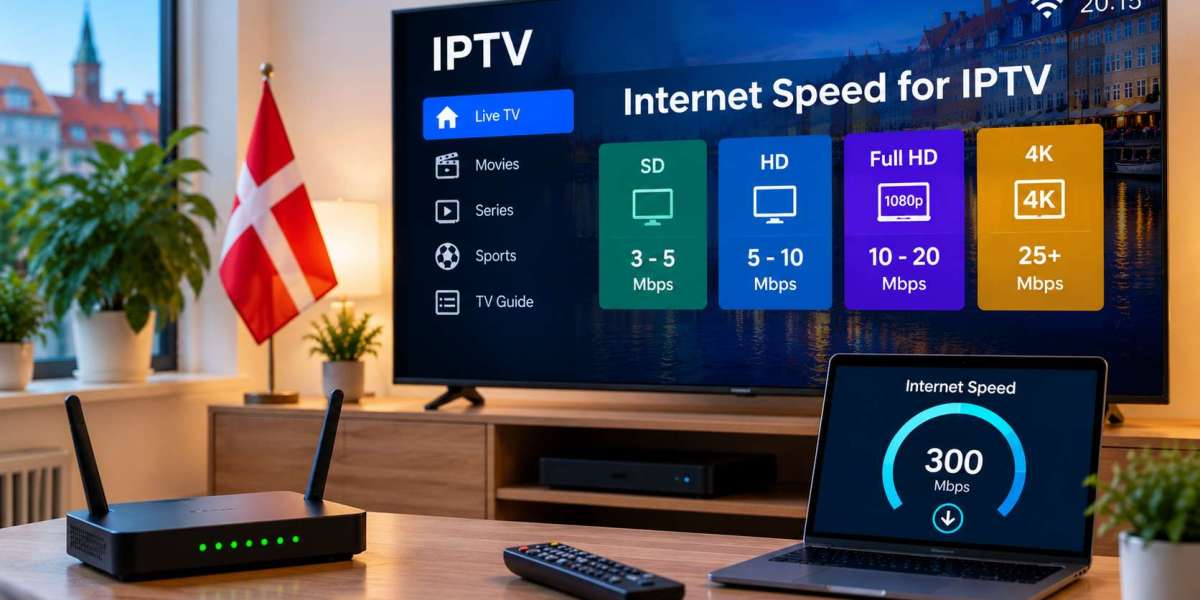

A reliable internet connection is one of the most important parts of a good IPTV experience. Even if a television, streaming device, and IPTV application are configured correctly, unstable broadband can still lead to buffering, reduced picture quality, or slow channel loading.
For viewers in Denmark, understanding how internet speed affects IPTV can make it easier to choose the right home setup. Download speed matters, but it is only one part of the picture. Wi-Fi quality, network congestion, device performance, and the number of simultaneous streams can all influence playback.
Why Internet Speed Matters for IPTV
IPTV delivers television content through an internet connection. Unlike traditional broadcast television, the video stream must continuously transfer data to the viewing device.
Higher-quality video generally requires more bandwidth.
A standard-definition stream requires less data than HD, while Full HD and 4K content place greater demands on the connection.
However, having a high advertised broadband speed does not automatically guarantee smooth IPTV performance. The connection also needs to remain stable while the stream is playing.
Understanding Download Speed
Internet speed is commonly measured in megabits per second, or Mbps.
The download speed determines how quickly data can travel from the internet to your device.
For IPTV, the required speed depends on several factors:
- Video resolution
- Compression used by the stream
- Number of simultaneous viewers
- Other internet activity in the home
- Stability of the connection
There is therefore no single speed that is perfect for every household.
Standard Definition Streaming
Standard-definition video normally requires less bandwidth than higher resolutions.
It may be suitable for smaller screens, mobile devices, or connections where bandwidth is limited.
Although SD uses less data, picture quality is noticeably lower than modern HD content, particularly on larger televisions.
For most households with modern broadband, HD is usually a more relevant benchmark.
HD and Full HD IPTV
HD and Full HD are widely used for live television, sport, films, and series.
These streams require more bandwidth than SD because they contain more visual information.
A connection may appear fast enough on paper but still experience problems if:
- Wi-Fi coverage is weak
- Several devices are streaming at once
- Large downloads are running
- The router is overloaded
- Internet performance changes throughout the day
It is therefore useful to leave additional bandwidth available rather than using the connection at its absolute limit.
What About 4K IPTV?
4K video has a much higher resolution than HD and Full HD.
This means it typically requires significantly more data.
For reliable 4K streaming, several parts of the setup must work together:
- The IPTV source must actually provide 4K content
- The television must support 4K resolution
- The streaming device must handle 4K playback
- The application must support the format
- The internet connection must remain stable
A fast broadband package alone cannot guarantee 4K quality if another part of the setup is limiting performance.
One Stream Versus Several Streams
The number of devices using IPTV at the same time can have a major impact on bandwidth requirements.
A single television streaming HD content may work perfectly, while adding another television, tablet, and computer can place much greater pressure on the connection.
For example, a household might have:
- One Smart TV showing live sport
- Another television streaming a film
- A tablet playing children's content
- A computer downloading files
- Several smartphones connected to Wi-Fi
All of these devices share the same internet connection.
When planning an IPTV setup, consider the whole household rather than just one television.
Wi-Fi Speed Is Not the Same as Broadband Speed
A common mistake is assuming that the speed supplied by the internet provider is exactly what the television receives.
This is not always the case.
Your broadband connection might be fast, but the Smart TV could receive a much weaker connection over Wi-Fi.
Distance from the Router
The farther the television is from the router, the weaker the signal may become.
Walls, floors, furniture, and other obstacles can reduce wireless performance.
Wireless Interference
Nearby Wi-Fi networks and other electronic equipment can also affect the signal.
In apartment buildings, several neighbouring networks may be using the same wireless frequencies.
Older Equipment
An older router or television may not support newer Wi-Fi standards and could limit performance.
Ethernet Can Provide Greater Stability
When possible, connecting the television or IPTV box directly to the router with an Ethernet cable can provide a more consistent connection.
Ethernet can reduce problems caused by:
- Weak wireless signals
- Distance from the router
- Wi-Fi interference
- Signal fluctuations
This can be particularly useful for televisions that remain in one location and do not need wireless mobility.
If IPTV works well over Ethernet but buffers over Wi-Fi, the home wireless network is likely the issue.
Test the Connection on the Actual IPTV Device
Running a speed test on a phone next to the router does not necessarily tell you how well the television is connected.
For a more realistic result, test the connection on or near the device used for IPTV.
If the Smart TV does not have a speed-test application, you can test another device in the same location and on the same Wi-Fi network.
Try testing at different times of day as well.
If the results vary significantly, connection stability may be more important than the maximum speed shown in a single test.
How Network Activity Affects IPTV
Other internet activity can reduce the bandwidth available for television streaming.
Common examples include:
- Cloud backups
- Large software updates
- File downloads
- Online gaming
- Video calls
- Other streaming services
- Multiple IPTV streams
If buffering suddenly appears, check whether another device has started a bandwidth-heavy activity.
Temporarily pausing downloads or other streams can help determine whether network congestion is the cause.
Choosing a Suitable IPTV Setup
Internet performance should be considered together with device compatibility and application support.
Before selecting a longer subscription, confirm that the service works with the equipment already used in your home.
Users researching IPTV subscriptions, device compatibility, and setup options for the Danish market can include DANMARK IPTV in their comparison when evaluating which arrangement best suits their viewing needs.
Testing the service on the intended device and network can provide more useful information than relying only on advertised internet speeds.
Router Placement Can Make a Difference
If Ethernet is not practical, improving router placement may help.
A router generally performs better when it is:
- Positioned in an open area
- Placed above floor level
- Located centrally in the home
- Away from large metal objects
- Not hidden inside a cupboard
Moving the router even a short distance can sometimes improve the signal received by a Smart TV.
Larger homes may require additional networking equipment to provide consistent coverage.
Do You Need the Fastest Broadband Package?
Not necessarily.
A very fast connection can be useful for homes with many devices, but stability and network quality remain important.
Upgrading broadband may not solve IPTV problems caused by:
- Poor Wi-Fi coverage
- An old router
- A slow streaming device
- Application problems
- A weak IPTV source
Before upgrading the internet package, identify where the problem actually occurs.
A stable connection with suitable equipment can often provide a better experience than a faster connection with poor Wi-Fi.
Consider Data Usage
Streaming television can use a significant amount of data, particularly at higher resolutions.
Households with unlimited broadband may not need to worry about this, but users with a connection that includes a data allowance should check their provider's terms.
The amount of data consumed depends on factors such as resolution, bitrate, and viewing time.
4K streams generally use substantially more data than standard-definition video.
Check the Device Too
Internet speed is only one part of the IPTV system.
Older televisions and streaming boxes may have limited memory or processing power.
If the internet connection is stable but the application remains slow, consider checking:
- Available device storage
- Software updates
- Background applications
- IPTV player compatibility
- Device age and performance
Testing the same service on another device can help determine whether the hardware is responsible.
Keep Legality and Content Rights in Mind
IPTV refers to the technology used to deliver television over the internet. It does not automatically determine whether a particular service is authorised.
The legality of specific content depends on licensing and distribution rights.
Users should research services carefully and consult current Danish rules and reliable legal sources when uncertain about a particular IPTV provider or stream.
Final Thoughts
The best internet speed for IPTV in Denmark depends on how the service is used.
A household watching one HD stream has different requirements from a home running several televisions, mobile devices, and 4K streams at the same time.
Rather than focusing only on the maximum advertised broadband speed, consider connection stability, Wi-Fi coverage, router quality, device performance, and overall household internet activity.
Testing the connection on the actual IPTV device and comparing Wi-Fi with Ethernet are useful first steps. With a stable network and compatible equipment, viewers can create a more reliable setup for live television, films, series, and sports.