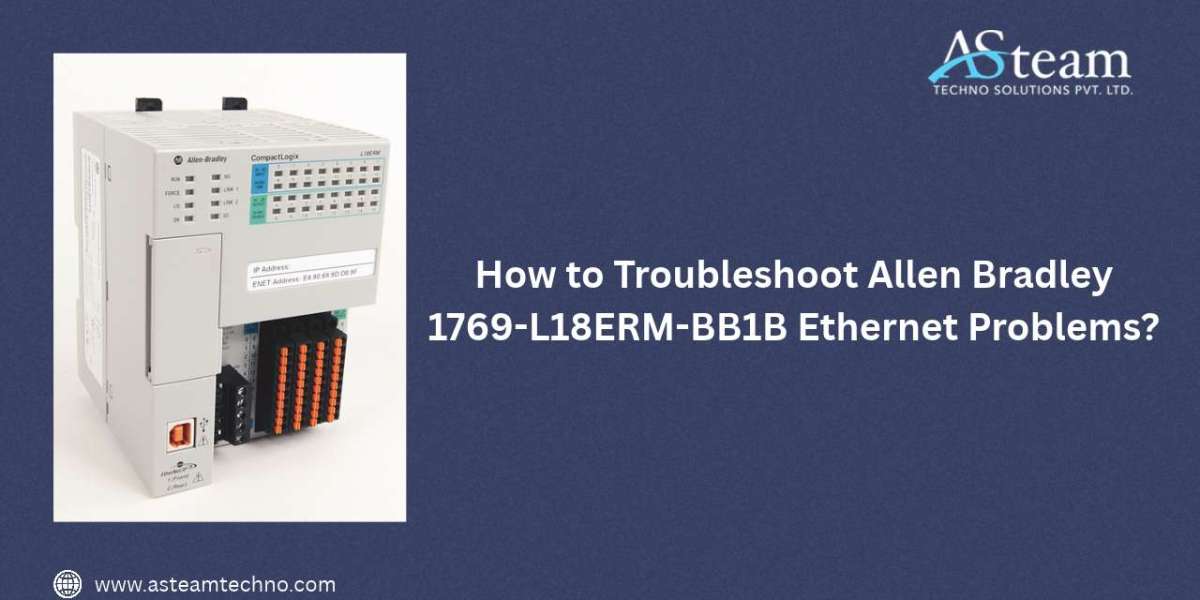

The Allen Bradley 1769-L18ERM-BB1B is a CompactLogix 5370 L1 controller designed for industrial automation applications requiring EtherNet/IP communication and integrated motion capabilities. It provides two built-in Ethernet ports and supports star, linear, and Device Level Ring (DLR) network topologies.
When Ethernet communication fails, the problem may originate from incorrect IP configuration, damaged cables, switch settings, duplicate IP addresses, firmware conditions, or network topology issues. A systematic troubleshooting approach can help identify the cause without unnecessarily replacing the controller.
Check the Ethernet Cable and Port
Start with the physical network connection. Inspect the RJ45 Ethernet cable for damaged connectors, broken locking tabs, cuts, or excessive bending. Replace the cable temporarily with a known-good industrial Ethernet cable to determine whether the cable is responsible.
The 1769-L18ERM-BB1B has two Ethernet ports, allowing it to participate in different network configurations. Try connecting the network cable to the other Ethernet port. If communication works through one port but not the other, inspect the affected port and its associated network connection.
Also examine the Ethernet link/activity indicators. No link indication can point toward a cable, switch port, connector, or physical-layer problem rather than an application configuration issue.
Verify the IP Address
An incorrect IP address is one of the most common causes of Ethernet communication problems. Confirm that the controller's IP address, subnet mask, and gateway match the network design.
Use RSLinx Classic or Studio 5000 Logix Designer to identify the controller and review its communication configuration. Make sure the address you are attempting to reach is actually assigned to the 1769-L18ERM-BB1B.
Pay particular attention after firmware updates or controller replacement. A controller can return to an initial or unconfigured Ethernet state under certain circumstances. In such cases, the device may not respond at the previously assigned address.
Look for Duplicate IP Addresses
A duplicate IP address can produce intermittent or completely failed communication. If another device has been configured with the same address, the network may behave unpredictably.
Disconnect the suspected controller from the network and check whether another device continues responding to its IP address. You can also use your network-management tools to identify duplicate addresses.
If a duplicate is found, assign each device a unique IP address according to your plant's network-addressing scheme.
Check the Ethernet Switch
The controller may be operating correctly while the connected Ethernet switch is causing the communication failure. Check the switch's port LEDs and verify that the corresponding port is active.
If possible, connect the controller directly to a known-good switch port. This can help isolate problems involving VLAN configuration, port restrictions, speed/duplex settings, or damaged switch hardware.
The CompactLogix 5370 family supports standard switches and 10/100 Mbps Ethernet operation, making the network infrastructure an important part of troubleshooting.
Examine Network Topology
The 1769-L18ERM-BB1B supports star, linear, and DLR EtherNet/IP network configurations.
For a star configuration, normally one controller port connects to the Ethernet switch. For linear or DLR configurations, both Ethernet ports may be used.
If the controller is installed in a DLR network, inspect both connections. A disconnected or damaged cable can affect ring integrity. Check the network devices connected before and after the controller and look for network-status indications showing a fault.
If communication becomes normal after removing the controller from the larger network and connecting it to a simple test setup, the issue may be related to the plant network rather than the controller itself.
Check Studio 5000 and Controller Status
Open the project in Studio 5000 Logix Designer and inspect the controller's communication status. Look for connection errors, I/O faults, or diagnostic messages.
The controller's status indicators can provide valuable information. Compare the observed LED pattern with the troubleshooting information in the CompactLogix 5370 Controllers User Manual. Rockwell Automation identifies publication 1769-UM021 as the user manual for this controller family.
If the controller is visible through USB but not Ethernet, this is a useful indication that the processor is functioning and that the problem may be limited to Ethernet configuration or the physical network path.
Check Firmware and Communication Configuration
Firmware compatibility should also be considered when communication problems begin after an upgrade, downgrade, or controller replacement. Confirm the controller firmware revision and make sure it is compatible with the Studio 5000 version being used.
Rockwell Automation currently lists firmware downloads for the CompactLogix 5370 family on its product documentation page. Always verify the exact firmware requirements for your controller series before performing an update.
Avoid repeatedly flashing firmware simply because Ethernet communication has failed. First establish whether the controller is receiving power, whether its status indicators are normal, and whether it can be accessed through another supported connection.
Test the Controller in a Simple Network
If the problem remains unresolved, isolate the controller from the production network. Connect the 1769-L18ERM-BB1B to a known-good Ethernet cable and switch, preferably with only a computer and controller connected.
Assign a suitable IP address and attempt to establish communication through Studio 5000 or RSLinx. If the controller communicates successfully in this isolated setup, reconnect network components one at a time.
This method helps identify whether the problem is caused by a switch, cable, network configuration, duplicate address, or another EtherNet/IP device.
Final Troubleshooting Checklist
Before concluding that the controller has a hardware fault, verify:
Ethernet cable and RJ45 connectors
Ethernet port link/activity indicators
Correct IP address and subnet mask
Duplicate IP address conditions
Ethernet switch operation
DLR or linear topology connections
Studio 5000 communication path
Controller status indicators
Firmware compatibility
Network configuration and VLAN settings
Communication using a known-good isolated network
The Allen Bradley 1769-L18ERM-BB1B provides integrated dual-port EtherNet/IP functionality, so a structured diagnostic process can usually narrow the problem to the physical connection, network configuration, topology, software, or controller hardware.
FAQs
1. Why is my 1769-L18ERM-BB1B not visible in RSLinx?
Check the Ethernet cable, switch connection, IP address, and communication driver. If Ethernet communication remains unavailable, try accessing the controller through USB to determine whether the processor is operating normally.
2. Can a duplicate IP address cause Ethernet communication failure?
Yes. Two devices using the same IP address can cause intermittent or complete communication problems. Verify that the 1769-L18ERM-BB1B has a unique address on the control network.
3. Does the 1769-L18ERM-BB1B support DLR?
Yes. The controller has two built-in EtherNet/IP ports and supports Device Level Ring, linear, and star network topologies.
4. What should I do if one Ethernet port works but the other does not?
Test the suspected port with a known-good cable and switch connection. If the problem consistently follows the port, inspect the port and controller documentation before considering hardware service or replacement.
5. Can firmware cause Ethernet problems on the 1769-L18ERM-BB1B?
Yes, firmware and software compatibility can affect controller communication, particularly following firmware changes. Verify the controller revision and compatible Studio 5000 version before updating or downgrading firmware.
Reach Us
Need the right automation solution for your industrial project?
Asteam Techno Solutions Pvt. Ltd. is your trusted source for industrial automation hardware, software, and engineering services. We work closely with OEMs, pharmaceutical companies, chemical plants, petrochemical facilities, oil & gas industries, panel builders, and manufacturing businesses to solve complex automation challenges.
From PLCs, VFDs, HMIs, SCADA systems, Panel PCs, Profibus connectors, and industrial communication solutions to complete automation integration services, we provide products and expertise under one roof.
Our specialists can help you:
Select the right automation products
Upgrade legacy control systems
Improve plant productivity and reliability
Reduce maintenance costs and downtime
Implement scalable automation solutions
Get in touch today(contact@asteamtechno.com) and let our automation experts recommend the best solution for your application.